

KEY TAKEAWAY: Odoo 20 was released in late September 2026 with AI agents as its headline theme: agents can create and update records, run automated processes and connect to external AI tools through MCP. The release also adds an expanded offline mode and improvements to sales, inventory, accounting, payroll and construction. The strategic value is high, but every AI feature now requires paid credits, and some accounting and payroll changes demand preparation before an upgrade.
For executives who rely on an ERP, the question this quarter is simple: is Odoo 20 worth evaluating, and when is the right moment to move? Odoo 20 was unveiled at Odoo Experience in Brussels from 24 to 26 September 2026 and is now available to the global community. This article summarizes what is new in Odoo 20 based on the official release notes at odoo.com and the 20.0 documentation, then translates the features into business impact, risk and a practical decision path.
Odoo 20 at a Glance: What Is Actually New
Odoo 20 is the latest major version of Odoo, and it moves AI from answering questions to doing work. In Odoo 19, AI mostly summarized and responded. In Odoo 20, AI agents can create and update records, read uploaded files such as PDFs, and run as part of automated actions.
Beyond AI, four themes deserve executive attention. First, an offline mode that now covers creating, editing, archiving and deleting records. Second, supply chain refinements such as suggested reordering and an allocation report. Third, a simplified access rights model and a restructured accounting flow. Fourth, industry packages, including construction with a Work Breakdown Structure (WBS) view. The dashboard, dialogs and mobile experience have also been refined.
| Area | Key change in Odoo 20 | Impact for leadership |
|---|---|---|
| AI | Agents create and update data, plain-language automation, voice input, MCP connection | Higher productivity, but new credit costs and governance needs |
| Field operations | Offline mode, Field Service inside Planning, Phone with recording and transcripts | Teams on site keep working when connectivity drops |
| Supply chain | Suggested reordering, allocation report, vendor rating, continuous production | Healthier stock and more measurable purchasing decisions |
| Finance and HR | Paying bills from Odoo, duplicate detection, net-to-gross simulation, test pay runs | Tighter control, with process changes to prepare for |
| Construction | Cost-based quoting, WBS view, worksite stock locations, progress management | Easier control of project schedule and cost |

Figure 1. A leadership team reviews the unified dashboard that becomes the center of decisions once Odoo 20 is in place.
AI Agents in Odoo 20: From Assistant to Process Operator
An AI agent in Odoo 20 is a virtual assistant that understands natural language, performs tasks and interacts directly with tools inside Odoo. According to the Odoo 20 introduction page, you describe a process in everyday language, the agent explains exactly what it is about to do, and once approved the process runs by itself.
The examples Odoo gives are concrete: auto-confirming a sales order when its matching email arrives, assigning leads to the right salesperson, creating a project the moment a contract is signed, or alerting you when stock runs low. Agents can also work from uploaded files, including PDFs of instructions, and they show live updates on what they are doing instead of a generic “thinking” message. Voice input, clickable replies and automatic model selection are available as well.
The next strategic feature is the MCP (Model Context Protocol) server. The official documentation explains that users can connect an external AI agent directly to their Odoo database to read or modify data through their own AI workflows. For companies that already use AI assistants outside Odoo, this opens an integration path without complex API development. It also demands access-rights discipline, because an agent should only do what its user is allowed to do.
Two specialized agents are worth noting. In accounting, an agent can answer questions about receivables, gross profit and cash flow, and help investigate a suspected bank reconciliation error. In purchasing, an agent can review transaction history to show which vendors are worth renegotiating with. On the website, the AI assistant can build pages from a description, rewrite copy, translate and suggest SEO titles and descriptions.
One point matters for decision-makers: Odoo's release notes state that all AI features now require credits purchased through IAP. AI is therefore no longer a no-cost feature, and the budget should be estimated before business processes are built on agents.
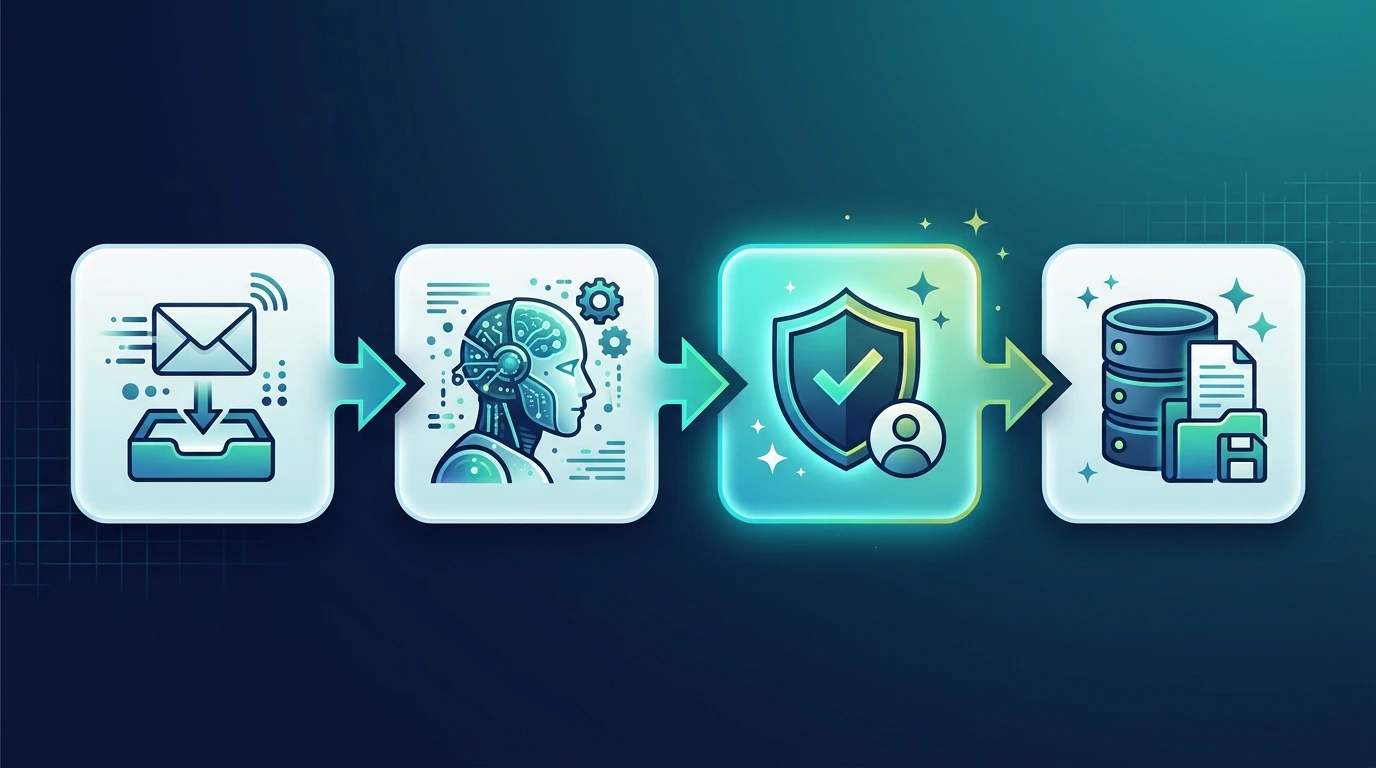
Figure 2. An AI agent automation flow with a human approval checkpoint before a record is created.
Offline Mode, Phone and Field Service: Operations That Keep Running
Offline mode in Odoo 20 lets users create, edit, archive, unarchive and delete records without an internet connection and sync them once back online. Previously run searches can also be executed again while offline. For companies with teams at project sites, warehouses or areas with unstable signal, this reduces the duplicated effort of retyping manual notes later.
The mobile experience has also been improved. There is a more secure login screen, a command palette opened by swiping down on the dashboard, a bottom-sheet date picker and better forms on touchscreens. Push notifications now run on Odoo's own tools instead of Firebase.
On the communication side, the Phone app lets you route calls by hours, location or team and buy and assign phone numbers from inside Odoo. Video calls can be recorded, screen-shared and automatically transcribed, so each line can be clicked to jump to that moment. Meanwhile, Field Service now lives inside Planning, with travel time and a map of the crew's live location. This means reports and automations that referenced Field Service tasks need to be pointed at Planning shifts.
Read Also: Field Data vs Headquarters Data: Here's How to Stop the Data Silo That Quietly Erodes Profits
Smarter Sales, Purchasing and Inventory
In the supply chain, Odoo 20 emphasizes decisions grounded in historical data. Suggested reordering rules are calculated from demand history, target coverage days and order frequency. Vendor quality ratings are built from past orders, while an allocation report shows which orders are waiting for incoming stock and allows one-click reservation.
Inventory reporting also grows: stock at a past date, a stock aging report, landed costs per product, and retroactive cost-of-goods-sold updates when costs change after delivery. For road freight, a CMR document can be prefilled from the delivery.
On the sales side, Odoo 20 adds quotation section templates, template selection when creating an order, editable margins that recalculate the price, and a toggle between prices with and without tax. Commissions can be based on the amount actually paid, including manager commissions. In manufacturing, continuous production lets operators register quantities on work orders so the next operation can be released without closing the entire manufacturing order, supported by new Kanban and Gantt planning views.

Figure 3. A warehouse supervisor uses reorder suggestions based on demand history to keep stock healthy.
Accounting and Payroll: Tighter Control, Better Preparation
Odoo 20 tightens financial control, and leaders need to understand the process impact. You can pay bills directly from Odoo with confirmation at your bank, individually or in bulk, although availability depends on your bank and country. The system also offers bill line prediction, two-level duplicate warnings, protection against double payments, manual or automatic customer payment reminders and automatic intercompany reconciliation.
The change with the greatest process impact is the rule that every journal entry touching a bank account must now come from a bank transaction. The separate Employee Expenses menu has also been merged into the accounting flow. Your finance team should review manual journal entries that were previously posted directly to bank accounts.
In payroll, there is a net-to-gross simulation starting from a target net salary, test pay runs with printed payslips before validation, working schedules defined in hours per day, and salary indexation by percentage or fixed amount. There is also an important warning: work entries and the Planning-to-Payroll integration have been removed, and work entry types were merged with time off types. Companies whose payroll relies on those elements must plan adjustments before upgrading. It is also essential to test the Indonesian localization for taxes and payroll on a database copy, since the release notes organize localization changes by country.
Odoo 20 for Construction: WBS, Cost and Progress
For contractors and developers, Odoo 20 introduces an industry package that addresses core project needs. The release notes list cost-based quoting with a dedicated cost update widget, a Work Breakdown Structure view built from sales orders and projects for easier scheduling, and dedicated worksite stock locations for inventory tracking, on-site delivery and drop-shipping.
There is also a progress management view that shows completion dynamically, customizable dashboard reporting, and the ability to share remarks on project tasks with suppliers. Together these answer three questions a project director faces daily: what the real cost is, how work is sequenced, and which materials are already on site. Combined with offline mode for field teams, the release is relevant to construction firms that want to shorten the gap between field data and management reporting.
Read Also: Is Your High-Rise Project Too Complex? Strengthen Project Control with Construction Management

Figure 4. Site engineers monitor progress and schedules directly from the project location.
Governance, Security and Cost: What You Must Budget For
Three non-functional issues decide whether Odoo 20 adoption succeeds: AI cost, the access rights model and custom module compatibility. First, AI cost. Because all AI features need IAP credits, choose a few well-defined processes and estimate credit usage before expanding. Some media reports also say Odoo adjusted the price of certain plans after keeping prices unchanged since 2022, citing rising AI, hosting and IT costs. Because pricing can differ by region, check the official quotation for your plan.
Second, access rights. Partner analysis on Odoo's own platform notes that separate record rules were removed and the domain defining which records an access right covers is now set on the access right itself. The Odoo Experience framework session also describes a redesigned, unified security model. The consequence is that custom modules with their own access rules must be adapted. AI agents acting on behalf of users should receive minimal permissions, and fully automatic creation of financial documents without approval is best avoided in the early phase.
Third, technical compatibility. For self-hosted installations, the 20.0 source requires Python 3.12 to 3.14 and PostgreSQL 16 or newer. Third-party and custom modules must be migrated and tested. Note also that a .0 release is usually followed by bug fixes in its first months, and some localization packages may arrive later.
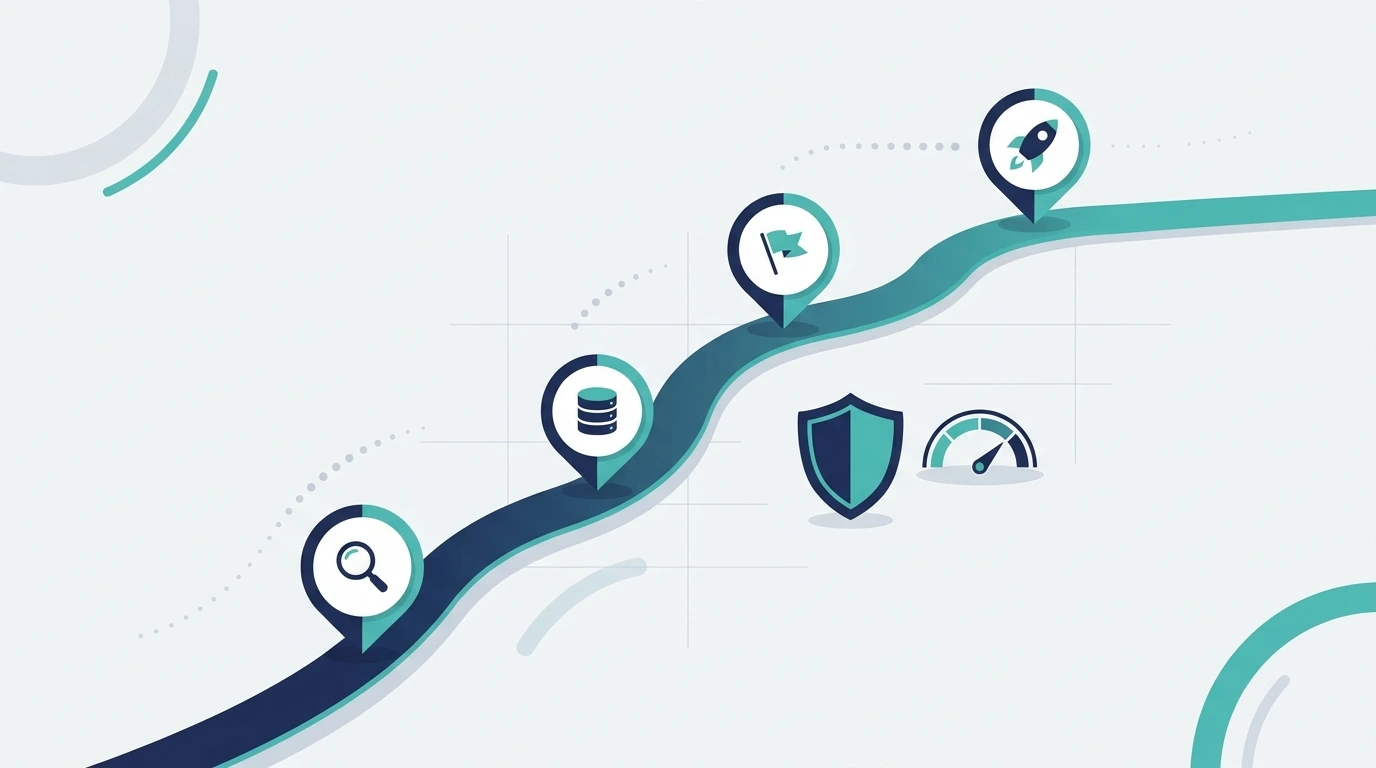
Figure 5. A staged upgrade roadmap: assessment, testing on a database copy, pilot, then go-live.
Decision Framework: Who Should Upgrade to Odoo 20 Now?
The upgrade decision should follow the operating profile of the company, not simply the availability of a new version. The table below offers a starting point for discussion, with the caveat that the final judgment depends on the level of customization and team readiness.
| Company profile | Initial recommendation | Main consideration |
|---|---|---|
| Manufacturing with minimal custom MRP modules | Plan the upgrade | Test custom MRP modules and benefit from continuous production |
| Contractors and project-based firms | Evaluate and pilot | Test WBS, cost-based quoting and offline mode on one project |
| Service firms using Field Service | Upgrade with caution | Prepare dispatcher training and repoint reports to Planning |
| Retail and POS | Wait for stabilization | POS session accounting logic changed and may affect custom receipts |
| Heavily customized databases | Defer and prepare migration | Custom access rules need rewriting, migration cost risk is high |
| Users of older versions nearing end of support | Start planning now | Check your version's support schedule in Odoo's official documentation |
The practical path has five stages. First, map all custom modules and integrations, including reports that depend on work entries or manual bank journals. Second, upgrade a copy of the database, never production first. Third, ask key users to test real processes, from quotation to cash closing. Fourth, run a pilot of one or two AI processes with a clear credit limit. Fifth, schedule go-live outside peak business periods, with a rollback plan.
Conclusion
Odoo 20 shifts the ERP from a system of record to a system that helps run processes. Its strategic value lies in three things: AI agent automation, uninterrupted field operations through offline mode, and industry features such as WBS for construction. On the other side, AI credit costs, the changed access rights model and adjustments in accounting and payroll require disciplined preparation. Companies that start by mapping customizations, testing on a database copy and running a measured pilot will be better placed to capture the benefits without sacrificing business continuity.
Odoo's Track Record Through 2026
For leaders weighing a system investment, the staying power of the platform provider matters as much as its features. Based on Odoo's official pages and press coverage from Odoo Experience 2026 in Brussels, this is the scale Odoo has reached.
| Indicator | Reported figure | Relevance for your company |
|---|---|---|
| Users | Over 28 million users worldwide, about 80% on free plans and 20% paying according to press reports | A large user base enriches the ecosystem, documentation and implementation talent |
| Applications | 50 main applications, regularly upgraded, complemented by more than 40,000 community-built apps | Sales, inventory, accounting, projects and HR run on one platform |
| Partner network | More than 21,000 partners | Implementation support is available in many regions, including Indonesia |
| Team and community | More than 8,000 employees and a community of 100,000+ developers | Sustained investment in product and security |
| Global reach | Revenue base spread over more than 180 countries | Suitable for companies with several sites and currencies |
| Business scale | A 10 billion euro valuation announced at Odoo Experience 2026, 620 million euros in revenue in 2025, and a billings target above 1 billion euros in fiscal 2027 | An indicator of the provider's long-term staying power |
The journey began with TinyERP in 2002, and according to CEO Fabien Pinckaers the company has grown about 50% a year for the past 20 years. The figures above are rounded and come from the About Us page at odoo.com and from Brussels Times coverage of statements by Odoo's management. Country counts vary with each source's definition, so this article uses only figures that Odoo or press reports of its statements provide. Scale does not guarantee results: success in your company is still determined by accurate process mapping, data discipline and adoption by users in the field.
Start with One Measured Step
Every company has different control points, so the right first step is not choosing features but understanding which processes have the greatest impact on your business. The Fujicon team is ready to help map your readiness for Odoo 20, build an upgrade roadmap and test the right AI scenarios with controlled cost and risk. Contact us for an initial consultation and demonstration:
WhatsApp: +6281122275222
Website: www.fujicon-japan.com