

Executive Summary
Consulting firms that run many projects at once need a single source of data that connects the client pipeline, contracts, progress, actual working hours, and project costs. Without it, management often learns that a project lost money only after the project has ended. This article covers five control priorities: a portfolio dashboard, progress and deadline control, timesheets, management of proposals through to contracts, and profitability analysis based on actual costs, followed by a realistic implementation roadmap.
More Projects Do Not Automatically Mean More Profit
Picture a consulting firm handling a dozen or more projects. Each project manager keeps a personal spreadsheet, the team reports progress over chat, and proposals for prospective clients sit in the inboxes of a few people. When the director asks, “Which project is most at risk this week?”, the answer only arrives after several people open their files and compile a summary.
This is normal for a growing company. But a pattern often repeats: the number of projects goes up while operational control does not keep pace. As a result, several problems appear at once:
- Project information is scattered across many spreadsheets.
- Management finds it hard to know the latest status of every project.
- Deadlines and team workloads are difficult to monitor.
- Actual working hours are not recorded consistently.
- Proposals and follow-ups with prospective clients are not managed well.
- Project profit is only known after the project ends.
The short answer to “how do you manage many consulting projects at the same time?” is to build consistent visibility over five things: the project portfolio, progress, working hours, the client pipeline, and actual costs. The sections below cover each of them in turn.
Why Layered Spreadsheets Are No Longer Enough
Spreadsheets remain useful for quick analysis, simulations, and temporary needs. The problem begins when they become the backbone of managing many projects.
Common risks include:
- Duplicated data. Client names, contract values, or target dates are retyped in several files and gradually drift apart.
- Late updates. Data is entered when someone remembers to update it, not when the event happens.
- Version conflicts. People hold different files and it is unclear which one is the latest.
- Time-consuming consolidation. Monthly reports take time because data has to be merged by hand.
- Dependence on individuals. Formulas and file structures are understood only by the person who built them.
Insight: “The problem is not simply the number of projects. The problem appears when the information needed to make decisions is not available consistently at the right time.”
Managing many projects requires coordinated processes, data, and responsibilities, not just tidier files.
Monitor All Projects on a Single Dashboard
A project dashboard is a concise view that brings the status of all projects onto one screen, so leaders do not need to open many files to understand the state of the portfolio.

A portfolio dashboard helps management find the projects that need attention.
Indicators worth tracking
- Project name and client.
- Project manager and team members.
- Project status and progress percentage.
- Start date and target completion date.
- Key milestones.
- Delayed or at-risk projects.
- Budget and actual costs, where integrated.
- Commercial and billing status, where the system supports it.
Portfolio dashboard vs. operational view
A portfolio dashboard is built for management: concise and focused on exceptions (projects that are delayed, over budget, or waiting for a decision). An operational view is built for project managers: detailed by task, owner, and date. Both should draw on the same data so the numbers never disagree.
Illustrative example: On Monday morning, a director opens the dashboard and sees three of fourteen projects marked “at risk”. One is two milestones behind, one has far exceeded its estimated hours, and one is waiting for client approval. The director immediately schedules discussions with the three project managers involved, without waiting for a manual summary. This is a hypothetical example to clarify the concept.
Track Progress and Deadlines Without Layered Spreadsheets
Healthy progress is not measured by a percentage typed in without context. A figure like “70%” means little if it is unclear which deliverables are finished and which are still pending. Tie progress to milestones, deliverables, and closed tasks.
The elements you need:
- Milestones linked to commitments made to the client.
- Assignments with a clear person in charge (PIC).
- Dependencies, meaning tasks that cannot start until other tasks are finished.
- Structured progress updates, not just chat messages.

A weekly review works best when it focuses on milestones and next actions.
A simple tracking table (illustrative)
| Project | Milestone | Target | Status | PIC | Next action |
|---|---|---|---|---|---|
| Project A | Initial report draft | Nov 15 | At risk | Rina | Add one analyst this week |
| Project B | Client presentation | Nov 20 | On schedule | Dimas | Finalize materials |
| Project C | Document revision | Nov 10 | Delayed | Sari | Escalate to the director and renegotiate the schedule |
The names and dates in the table are examples only.
Spotting delays early
Delays usually show up first as small signs: a milestone slips, tasks pile up on one person, or client revisions increase. Set an escalation rule, for example that any milestone slipping by more than a few days must be reported to the project lead before it affects commitments to the client.
Practical tip: For the weekly project review, keep it to 30–45 minutes, discuss only projects marked at risk or delayed, make sure every issue ends with a decision, an owner, and a date, and record the outcome in the same place as the project data.
Control Team Working Hours So Project Profit Becomes Measurable
A timesheet is a record of team members’ working hours by project, activity, and date. For a consulting firm, working hours are both the main cost and the “product” being sold, so how they are recorded determines how accurate any profit analysis can be.

Recording actual working hours is the foundation of cost and profit analysis.
Four types of hours to distinguish
- Planned hours: the hours estimated when the project was scoped.
- Actual hours: the hours genuinely spent.
- Billable hours: hours that can be charged to the client under the contract.
- Non-billable hours: internal hours, such as internal meetings, administration, or training.
Comparing actual hours with planned hours helps detect labor cost overruns before the project is finished.
Illustrative example: A project is planned to take 120 working hours, but actual hours reach 165. The difference is 45 hours, or 37.5% above plan. Management should examine the cause: was the original estimate too low, was there work outside the scope, did the client request many revisions, or was the way of working inefficient? The findings determine the action, such as revising estimates for future projects or renegotiating the scope. These figures are purely illustrative, not customer data and not an industry benchmark.
For timesheets to be useful, recording must be easy, filled in with discipline (ideally daily), and validated by the person responsible for the project.
Insight: “Unrecorded hours still cost money. Without adequate recording, a company risks misjudging the efficiency and profitability of its projects.”
Manage Proposals Through to Client Contracts with an Integrated CRM
Customer Relationship Management (CRM) is an approach and a system for managing relationships with prospective clients and existing clients, including communication history, sales opportunities, and follow-up schedules.
Stages a consulting firm can apply:
- A prospect or lead comes in.
- Qualify the prospective client’s needs.
- Meet and identify the needs in detail.
- Prepare and send the proposal.
- Follow up and negotiate.
- Proposal approval.
- Contract or purchase order (PO).
- Hand over information to the project delivery team.

A well-recorded pipeline keeps proposal follow-ups from slipping through.
If the system supports it, recording at each stage preserves communication history, follow-up schedules, opportunity values, proposal status, and a forecast of upcoming work. The biggest benefit lies in the last step: when the sales process is connected to operations, the information promised to the client does not get lost as the project moves from the business development team to the delivery team.
Calculate Project Profitability Based on Actual Costs
Project profitability measures how much profit a project generates after the relevant costs are deducted. Actual costs are the costs that genuinely occurred, not just those that were budgeted.
Contract value is not the same as profit. A large contract with ballooning hours and high external expert costs can still produce a thin margin.
Components of the analysis
- Revenue or contract value recognized according to the company’s accounting policy.
- Labor cost based on working hours and internal cost rates.
- External expert costs.
- Travel and project operating costs.
- Other direct costs.

Actual costs per project give a more honest margin than contract value alone.
Conceptual formulas
- Project profit = Project revenue − Relevant project costs
- Project profit margin (%) = Project profit ÷ Project revenue × 100%, provided revenue is positive
Illustrative example: the simple simulation below is not a projection or a Fujicon customer result.
| Component | Value (illustrative) |
|---|---|
| Project revenue | IDR 300,000,000 |
| Labor cost | IDR 120,000,000 |
| External expert cost | IDR 35,000,000 |
| Travel and operating cost | IDR 15,000,000 |
| Total cost | IDR 170,000,000 |
| Project profit (before unallocated overhead and tax) | IDR 130,000,000 |
| Margin | ≈ 43.3% |
The calculation: IDR 300 million − IDR 170 million = IDR 130 million, and IDR 130 million ÷ IDR 300 million × 100% ≈ 43.3%. This is a simple simulation, not a projection or a Fujicon customer result. The margin will differ if a company includes overhead allocation, financing costs, taxes, or other components.
Warning: Inconsistent data and unrecorded costs are a real risk. If working hours, external expert fees, or travel costs are not recorded per project, the margin shown in reports can be far higher than reality. Decisions about pricing proposals and adding staff that rely on those figures can be costly.
Also compare the budget with actual costs regularly and update the forecast cost needed to finish the project (estimate to complete). This information supports decisions about adding staff, changing the scope, revising estimates, rescheduling, and negotiating additional work.
Integrating Commercial, Project, and Financial Data
The five topics above are really one chain. The ideal flow is:
Prospect → Proposal → Contract → Project planning → Team assignment → Timesheet recording → Progress monitoring → Cost recording → Profitability analysis → Project evaluation
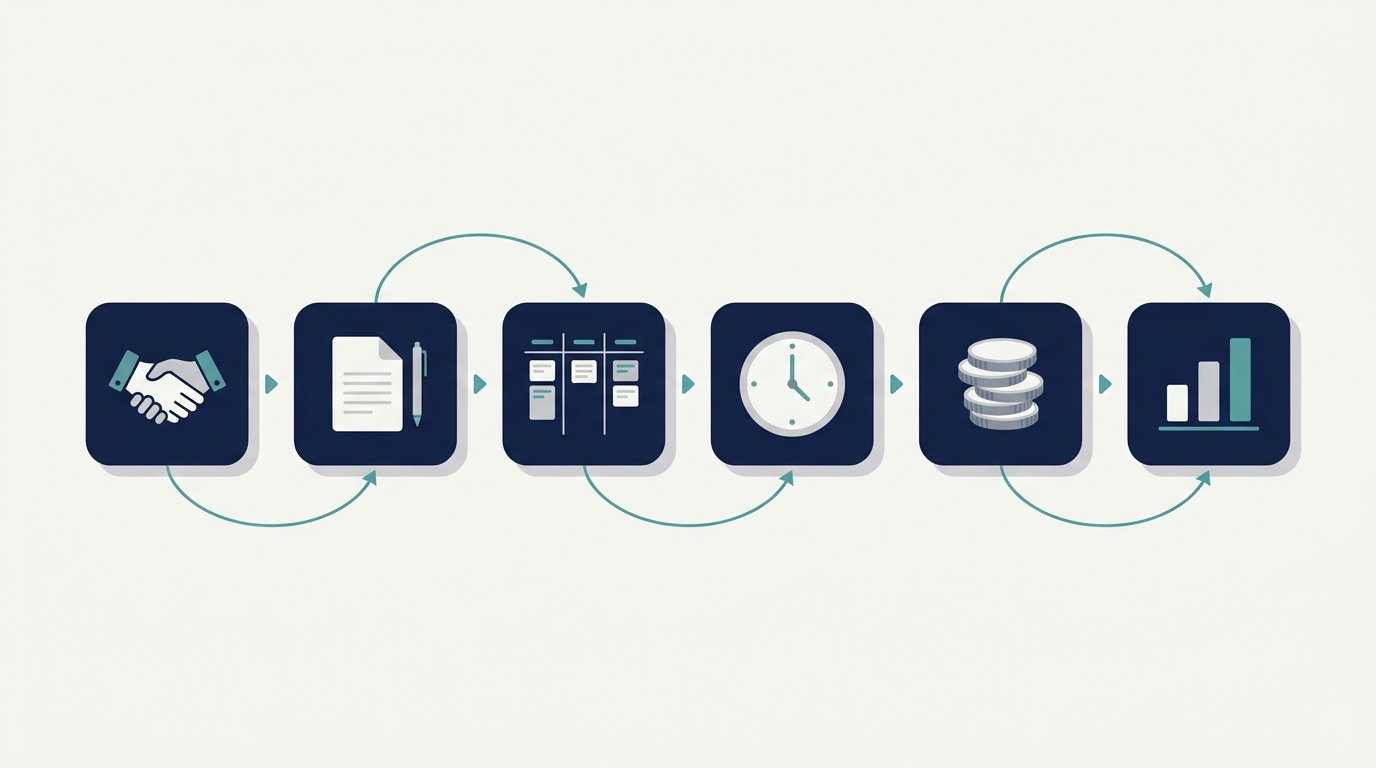
Connected data from proposal to project evaluation.
The project evaluation then feeds into the next proposal, for example with more realistic hour estimates.
The benefits of integration are consistent data, less repeated entry, clearer responsibilities, and greater visibility for management. The level of integration you can reach still depends on the chosen system, its configuration, process discipline, and the integrations that are actually available. An integrated system is not a guarantee. It is a tool whose results depend on the quality of the process behind it.
How to Start Implementing an Integrated System
A company does not have to implement everything at once. The following phased approach is more realistic:
- Map business processes and the main problems. Note where information gets lost or arrives late.
- Define performance indicators and the definitions of cost and profitability. Agree on the margin formula and the cost components.
- Clean up master data: clients, projects, team members, activities, and cost rates.
- Prioritize the dashboard, project tracking, and timesheets.
- Connect CRM, proposals, and contracts.
- Build actual cost and profitability reporting as needed.
- Test, train, evaluate, and refine.
Practical tip: Start with the problem that costs you the most. If hour overruns happen most often, begin with timesheets and project tracking. Expand to other areas once data and processes in the first area are stable.
Implementation readiness checklist:
- There is a process owner for each area (projects, timesheets, proposals, finance).
- The definitions of “project”, “billable hours”, and “margin” have been agreed.
- Client, project, and team data has been cleaned up.
- Internal cost rates per role or per person have been set.
- The team is willing to fill in timesheets regularly.
- There is a regular schedule to review the reports the system produces.
Getting to Know Fujicon’s Business Solutions
Readers who want to learn more can visit solusipintar.fujicon.id, the website of PT Fujicon Priangan Perdana. According to the information on that page, Fujicon offers an integrated ERP system with modules such as Accounting, HRIS, Inventory, Manufacturing, Sales, and Project. The Project module is described as helping monitor work progress, deadlines, and team productivity, while the Sales module covers quotations, sales orders, customers, and invoices. The page also mentions consulting, implementation, user training, customization, and integration with other systems through an API.
Every consulting firm works differently. For that reason, matters such as timesheet recording, the flow from proposal to contract, and profitability reporting should be discussed directly based on your business needs, not assumed from this article. This article offers a general way of thinking, while product capabilities should be confirmed with the solution provider.
Frequently Asked Questions (FAQ)
How do you manage many consulting projects at the same time?
Start with a single source of data for the project list, milestones, assignments, and working hours. Add a portfolio dashboard for management, a weekly review that focuses on at-risk projects, and clear escalation rules. Then connect commercial and cost data so profit becomes visible before a project ends.
Why do consulting firms need a project dashboard?
A project dashboard shows the status, progress, deadlines, and risks of all projects in one view. Leaders can find projects that need attention sooner, without waiting for a manual summary, so decisions such as reallocating the team or escalating to the client can be made earlier.
What are the benefits of timesheets for a consulting firm?
Timesheets show actual working hours by project and activity. By comparing them with estimates, a firm can detect cost overruns, improve the estimates in its next proposals, assess team utilization, and separate billable from non-billable hours.
How do you calculate the profitability of a consulting project?
Subtract the relevant project costs from project revenue: labor, external experts, travel, and other direct costs. The margin is calculated by dividing project profit by revenue and multiplying by 100%. Decide at the start whether overhead is allocated, so figures can be compared across projects.
What is the difference between contract value and project profit?
Contract value is the amount agreed with the client, while profit is what remains after project costs are deducted. Two projects with the same contract value can have very different profit, depending on actual hours, external expert costs, and scope changes.
How does CRM help manage proposals and contracts?
A CRM records the opportunity stage, proposal value, communication history, and follow-up schedule in one place. As a result, no proposal is forgotten, management can forecast upcoming work, and contract information is easier to pass on to the project delivery team.
When should a consulting firm move from spreadsheets to an integrated system?
Common signals include monthly summaries that take days, figures that differ between files, project profit that is only known after completion, or staff turnover that causes project information to be lost. If two or three of these signals are already present, evaluating an integrated system is worthwhile.
What should be prepared before implementing a business management system for a consulting firm?
Prepare a process map, definitions of indicators and margin, clean master data, internal cost rates, process owners, and the team’s commitment to disciplined data entry. Readiness of processes and data quality matter more to success than the number of features.
Key Takeaways
- More projects do not automatically mean more profit unless operational control grows with them.
- A portfolio dashboard gives leaders a view of every project without opening many files.
- Progress should be tied to milestones and deliverables, not just a percentage.
- Timesheets separate planned, actual, billable, and non-billable hours, making labor cost visible.
- A CRM connected to operations reduces information lost at project handover.
- Project profit = revenue − relevant costs; contract value is not profit.
- Implementation should be phased: processes and data quality first, then wider functionality.
Conclusion
The five control priorities for a consulting business are: (1) visibility of all projects on one dashboard, (2) progress and deadline control, (3) recording actual working hours, (4) managing the client pipeline, proposals, and contracts, and (5) profitability analysis based on actual costs. All five work best when their data is connected and managed with disciplined processes.
For owners of consulting firms, the first step does not have to be big. Identify the most costly problem, clean up the data, and build control in stages.
Manage your consulting projects and business processes in a more structured way. Explore the available solutions through Solusi Pintar Fujicon.
Explore Solusi Pintar Fujicon
Still using separate spreadsheets to manage projects, working hours, and costs? Discuss your company’s business needs on WhatsApp.
Chat with Fujicon on WhatsApp